
What Units does
It supports length, weight, temperature, volume, area, speed, decimal and binary data sizes, plus CSS px, pt, and em units. You can choose which unit types are enabled.
How to use it
- Select a value with its unit, such as 10 km or 72°F.
- Choose Units or use the leading conversion chip.
- Review the converted value in the configured result style.
Example
10 km
6.21 mi
Settings
Open the action's settings from:
ActionClip Settings → Actions → Units → gear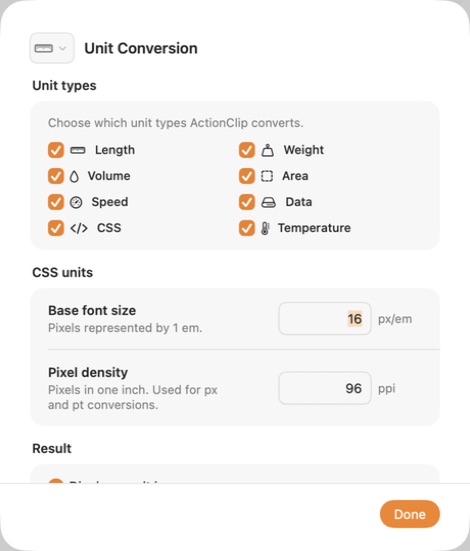
Unit types
Choose which kinds of measurement ActionClip should recognize and convert.
CSS units
When CSS is enabled, set the base font size used for em and the pixel density used for px and pt conversions.
Result
Choose whether the conversion opens in the result popup or uses the action's display-output behavior.
Display
Choose how this action appears in the floating widget. This changes only its presentation, not what it does.
Changes are saved automatically.
You can also replace this action's icon from ActionClip → Actions. See change an action icon.
When ActionClip suggests it
The leading Units suggestion appears when ActionClip detects one supported, unambiguous unit amount.
Enabled actions remain available in your Actions list even when Smart Suggestions do not promote them for the current selection.
Requirements and privacy
- Works locally and does not require Online Actions.
- Automatic suggestions avoid ambiguous unit matches.
- The selected number and unit must use a supported form.