
What Web Search does
You can keep the built-in Google, DuckDuckGo, or Bing option, or define a custom query URL using {query} or %s.
How to use it
- Select the words you want to search for.
- Choose Web Search from ActionClip.
- ActionClip opens the results using your chosen search engine and browser behavior.
Example
best macOS text selection utility
Search results in the configured browser
Settings
Open the action's settings from:
ActionClip Settings → Actions → Web Search → gear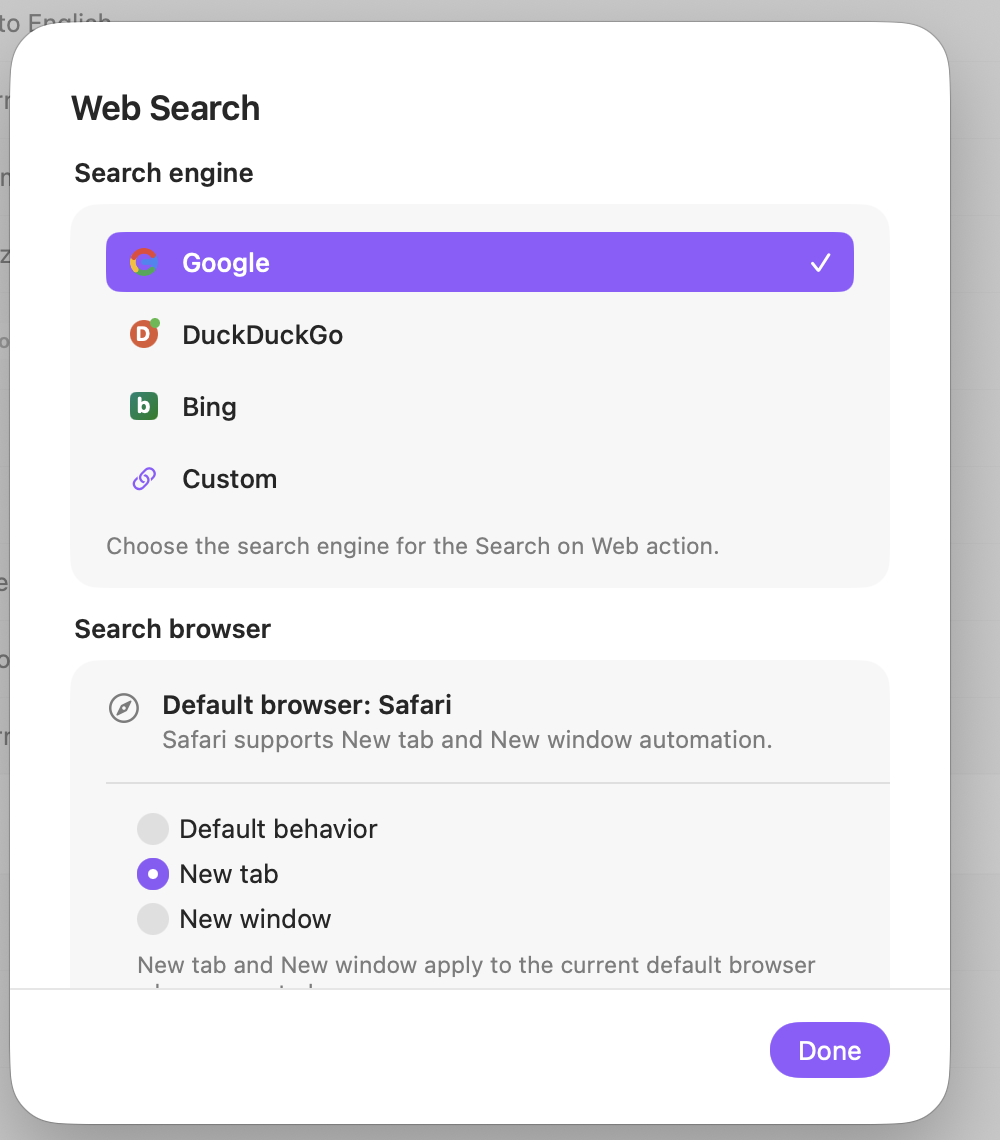
Search engine
Choose the service used for searches. Custom accepts a query URL template.
Custom query URL
For Custom, place {query} or %s where ActionClip should insert the encoded selected text. If neither is present, the query is appended.
Search browser
Choose how the current default browser should open the results when its automation is supported.
Display
Choose how this action appears in the floating widget. This changes only its presentation, not what it does.
Changes are saved automatically.
You can also replace this action's icon from ActionClip → Actions. See change an action icon.
When ActionClip suggests it
Web Search is promoted for read-only selections containing ten words or fewer.
Enabled actions remain available in your Actions list even when Smart Suggestions do not promote them for the current selection.
Requirements and privacy
- Requires Online Actions because it opens an external search service.
- New tab and New window are supported for Safari and Chromium-family default browsers; unsupported browsers fall back to default behavior.
- Your search engine receives the selected query.